using System;
using System.Diagnostics;
using System.Net;
using System.Net.Sockets;
using System.Text;

namespace EchoClient
{
    class MainApp
    {
        static void Main(string[] args)
        {
            // 프로그램 실행 시 필요한 인자가 부족하면 사용법 출력 후 종료
            if (args.Length < 4)
            {
                Console.WriteLine("사용법 : {0} <Bind IP> <Bind Port> <Server IP> <Message>",
                    Process.GetCurrentProcess().ProcessName);
                return;
            }

            // 명령어 인자에서 바인딩할 IP 주소, 포트, 서버 IP, 보낼 메시지를 저장
            string bindIp = args[0];
            int bindPort = Convert.ToInt32(args[1]);
            string serverIp = args[2];
            const int serverPort = 5425;  // 서버의 포트 번호 (고정)
            string message = args[3];

            try
            {
                // 클라이언트의 로컬 주소 설정
                IPEndPoint clientAddress = new IPEndPoint(IPAddress.Parse(bindIp), bindPort);
                // 서버의 주소 설정
                IPEndPoint serverAddress = new IPEndPoint(IPAddress.Parse(serverIp), serverPort);

                // 클라이언트와 서버 주소 정보 출력
                Console.WriteLine("클라이언트: {0}, 서버:{1}", clientAddress.ToString(), serverAddress.ToString());

                // TcpClient 객체 생성 및 로컬 주소 바인딩
                TcpClient client = new TcpClient(clientAddress);

                // 서버에 연결
                client.Connect(serverAddress);

                // 보낼 메시지를 바이트 배열로 변환
                byte[] data = Encoding.Default.GetBytes(message);

                // 데이터 송수신을 위한 스트림 객체 생성
                NetworkStream stream = client.GetStream();

                // 스트림을 통해 메시지 송신
                stream.Write(data, 0, data.Length);
                Console.WriteLine("송신: {0}", message);

                // 서버로부터의 응답을 받을 바이트 배열 생성
                data = new byte[256];
                string responseData = "";

                // 서버로부터 데이터를 읽어 문자열로 변환
                int bytes = stream.Read(data, 0, data.Length);
                responseData = Encoding.Default.GetString(data, 0, bytes);
                Console.WriteLine("수신: {0}", responseData);

                // 스트림 및 클라이언트 소켓 닫기
                stream.Close();
                client.Close();
            }
            catch (SocketException e)
            {
                // 소켓 예외 발생 시 콘솔에 예외 정보 출력
                Console.WriteLine(e);
            }

            // 프로그램 종료 메시지 출력
            Console.WriteLine("클라이언트를 종료합니다.");
        }
    }
}
TCP/IP 스택
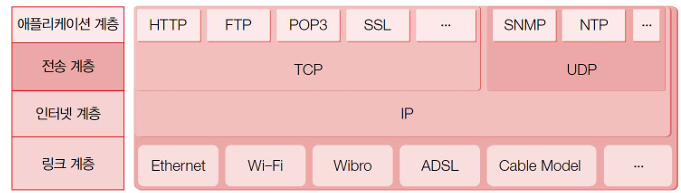
TCP/IP는 다음과 같이 4개의 계층으로 구성되어 있습니다.
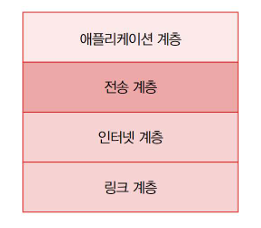
●링크계층
네트워크의 물리적인 연결매체를 통해 패킷을 주고받는 작업을 담당합니다.
어떤 패킷이 네트워크를 통해 가장 먼저 들어오면, 링크 계층이 맞이하고 패킷에서 데이터 전송에 사용되던 부분을 제거하고 인터넷 계층에 넘깁니다.
(ps.패킷은 네트워크를 통해 오가는 데이터를 일컫는 말입니다. 내용물 + 포장지 형태라고 이해하면 편합니다.)
●인터넷 계층
인터넷 계층은 패킷을 수신해야할 상대의 주소를 지정하고, 나가는 패킷에 대해서는 적절한 크기로 분할하며, 들어오는 패킷에 대해서는 재조립을 수행합니다. 이때, 여기에 사용하는 주소 체계가 바로 IP입니다.
●전송계층
패킷의 '운송'을 담당하는 프로토콜들이 정의되어 있습니다. 그 중에서도 전송제어 프로토콜은 송신측과 수신 측 간의 연결성을 제공하며, 신뢰할 수 있는 패킷 전송 서비스를 제공합니다. 여러개의 패킷을 송신하는 경우 패킷 사이의 순서를 보장하며, 패킷이 유실되면, 재전송까지 해줍니다. TCP/IP 프로토콜에서 TCP가 바로 이 프로토콜을 가르키며, TCP는 IP가 제공하지 않는 연결성, 신뢰성을 제공합니다.
●애플리케이션 계층
응용 프로그램 나름의 프로토콜들이 정의되는 곳입니다. 웹문서를 주고 받기 위한 HTTP, 파일교환을 위한 FTP, 네트워크 관리를 위한 SNMP등이 애플리케이션 계층에서 정의된 프로토콜의 대표적인 예입니다.
TCP/IP의 동작 과정
TCP/IP 통신을 위해서는 먼저 서버가 서비스를 시작히야 클라이언트가 접속 할 수 있습니다.
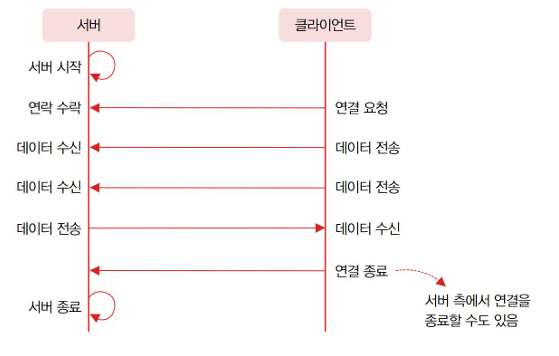
TcpListener와 tcpClient
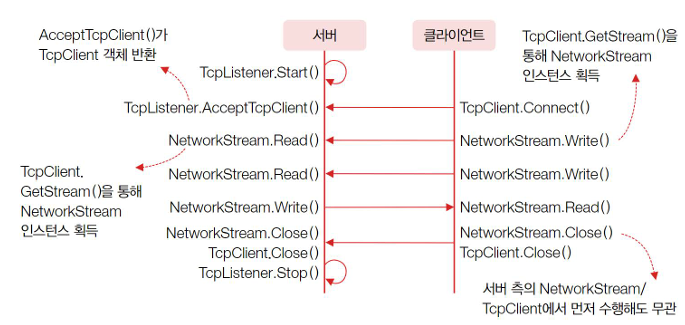
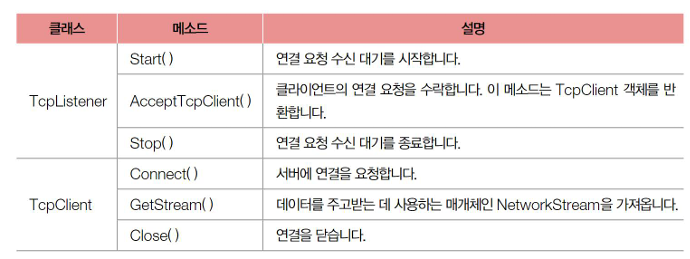
TcpListener
using System.Net;
using System.Net.Sockets;

IPEndPoint localAddres =
        new IPEndPoint(IPAddress.Parse("192.168.100.17"), 5425);

TcpListener server = new TcpListener(localAddres);

server.Start();- IPEndPoint는 IP통신에 필요한 IP 주소와 출입구(포트)를 나타냅니다.
- server 객체는 클라이언트가 TcpClinet.Connect()를 호출하여 연결을 요청하기를 기다리기 시작합니다.
Tcpclient
using System.Net;
using System.Net.Sockets;

IPEndPoint clinetAddres =
    new IPEndPoint(IPAddress.Parse("192.168.100.18"), 0);

TcpClient client = new TcpClient(clinetAddres);

IPEndPoint serverAddress =
    new IPEndPoint(IPAddress.Parse("192.168.100.17"), 5425);

client.Connect(serverAddress);- 포트를 0으로 지정하면 OS에서 임의의 번호로 포트를 할당해 줍니다.
- 서버가 수신대기하고 있는 IP주소와 포트번호를 향해 연결 요청을 수행합니다.
TcpListener
TcpClient client = server.AcceptTcpClient();- 서버에서 AcceptTcpClient()을 호출하면, 코드는 블록되어 그 자리에서 이 메소드가 반환할 때 까지 진행하지 않습니다. AcceptTcpClient()메소드는 클라이언트의 요청이 있기 전까지는 반환되지 않습니다.
- 기다리고 있던 연결요청이 오면 이 메소드는 클라이언트와 통신을 수행할 수 잇또록 TcpClient 형식의 객체를 반환합니다.
Tcpclient
using System.Net.Sockets;
using System.Text;

NetworkStream stream = client.GetStream();

int length;
string data = null;
byte[] buffer = new byte[256];

while ((length = stream.Read(bytes, 0, bytes.Length)) != 0)
{
    data = Encoding.Default.GetString(buffer, 0, length);
    Console.WriteLine(String.Format("수신: {0}", data));

    byte[] msg = Encoding.Default.GetBytes(data);

    stream.Write(msg, 0, msg.Length);
    Console.WriteLine(String.Format("송신: {0}, data"));
}- TcpClient를 통해 NetworkStream객체를 얻습니다.
- NetworkStream.Read() 메소드는 상대방이 보내온 데이터를 읽어들입니다.
- 상대와의 연결이 끊어지면 이 메소드는 0을 반환합니다
- 즉, 이 루프는 연결이 끊어지기 전까지는 계됩니다.
- Networkstream.Write()메소드를 통해 상대방에게 메세지를 전송합니다.
server
using System;
using System.Diagnostics;
using System.Net;
using System.Net.Sockets;
using System.Text;

namespace EchoServer
{
    class MainApp
    {
        static void Main(string[] args)
        {
            // 프로그램 실행 시 IP 주소를 인자로 받지 않으면 사용법을 출력하고 종료
            if (args.Length < 1)
            {
                Console.WriteLine("사용법 : {0} <Bind IP>", Process.GetCurrentProcess().ProcessName);
                return;
            }

            // 프로그램 실행 시 입력된 IP 주소를 저장
            string bindIp = args[0];
            const int bindPort = 5425;  // 서버에서 사용할 포트 번호 (5425로 고정)
            TcpListener server = null;  // TcpListener 객체 초기화

            try
            {
                // IP 주소와 포트 번호로 로컬 주소 생성
                IPEndPoint localAddress = new IPEndPoint(IPAddress.Parse(bindIp), bindPort);

                // TcpListener 객체 생성 및 시작
                server = new TcpListener(localAddress);
                server.Start();

                Console.WriteLine("메아리 서버 시작... ");  // 서버 시작 메시지 출력

                while (true)  // 무한 루프를 통해 클라이언트의 접속을 계속 대기
                {
                    // 클라이언트의 연결을 기다림
                    TcpClient client = server.AcceptTcpClient();
                    Console.WriteLine("클라이언트 접속 : {0}", ((IPEndPoint)client.Client.RemoteEndPoint).ToString());

                    // 클라이언트와 데이터 송수신을 위한 스트림 객체 생성
                    NetworkStream stream = client.GetStream();

                    int length;
                    string data = null;
                    byte[] bytes = new byte[256];  // 데이터를 담을 바이트 배열

                    // 데이터가 스트림에서 읽혀오는 동안 반복
                    while ((length = stream.Read(bytes, 0, bytes.Length)) != 0)
                    {
                        // 수신한 데이터를 문자열로 변환
                        data = Encoding.Default.GetString(bytes, 0, length);
                        Console.WriteLine(String.Format("수신: {0}", data));  // 수신한 데이터 출력

                        // 수신한 데이터를 다시 바이트 배열로 변환하여 클라이언트에 송신
                        byte[] msg = Encoding.Default.GetBytes(data);
                        stream.Write(msg, 0, msg.Length);
                        Console.WriteLine(String.Format("송신: {0}", data));  // 송신한 데이터 출력
                    }

                    // 스트림과 클라이언트 소켓을 닫음
                    stream.Close();
                    client.Close();
                }
            }
            catch (SocketException e)
            {
                // 소켓 예외 발생 시 콘솔에 예외 정보 출력
                Console.WriteLine(e);
            }
            finally
            {
                // 서버가 닫힐 때 TcpListener 중지
                server.Stop();
            }

            Console.WriteLine("서버를 종료합니다.");  // 프로그램 종료 메시지 출력
        }
    }
}
Tcpclient
using System;
using System.Diagnostics;
using System.Net;
using System.Net.Sockets;
using System.Text;

namespace EchoClient
{
    class MainApp
    {
        static void Main(string[] args)
        {
            // 프로그램 실행 시 필요한 인자가 부족하면 사용법 출력 후 종료
            if (args.Length < 4)
            {
                Console.WriteLine("사용법 : {0} <Bind IP> <Bind Port> <Server IP> <Message>",
                    Process.GetCurrentProcess().ProcessName);
                return;
            }

            // 명령어 인자에서 바인딩할 IP 주소, 포트, 서버 IP, 보낼 메시지를 저장
            string bindIp = args[0];
            int bindPort = Convert.ToInt32(args[1]);
            string serverIp = args[2];
            const int serverPort = 5425;  // 서버의 포트 번호 (고정)
            string message = args[3];

            try
            {
                // 클라이언트의 로컬 주소 설정
                IPEndPoint clientAddress = new IPEndPoint(IPAddress.Parse(bindIp), bindPort);
                // 서버의 주소 설정
                IPEndPoint serverAddress = new IPEndPoint(IPAddress.Parse(serverIp), serverPort);

                // 클라이언트와 서버 주소 정보 출력
                Console.WriteLine("클라이언트: {0}, 서버:{1}", clientAddress.ToString(), serverAddress.ToString());

                // TcpClient 객체 생성 및 로컬 주소 바인딩
                TcpClient client = new TcpClient(clientAddress);

                // 서버에 연결
                client.Connect(serverAddress);

                // 보낼 메시지를 바이트 배열로 변환
                byte[] data = Encoding.Default.GetBytes(message);

                // 데이터 송수신을 위한 스트림 객체 생성
                NetworkStream stream = client.GetStream();

                // 스트림을 통해 메시지 송신
                stream.Write(data, 0, data.Length);
                Console.WriteLine("송신: {0}", message);

                // 서버로부터의 응답을 받을 바이트 배열 생성
                data = new byte[256];
                string responseData = "";

                // 서버로부터 데이터를 읽어 문자열로 변환
                int bytes = stream.Read(data, 0, data.Length);
                responseData = Encoding.Default.GetString(data, 0, bytes);
                Console.WriteLine("수신: {0}", responseData);

                // 스트림 및 클라이언트 소켓 닫기
                stream.Close();
                client.Close();
            }
            catch (SocketException e)
            {
                // 소켓 예외 발생 시 콘솔에 예외 정보 출력
                Console.WriteLine(e);
            }

            // 프로그램 종료 메시지 출력
            Console.WriteLine("클라이언트를 종료합니다.");
        }
    }
}
프로토콜 설계와 네트워크 애플리케이션 프로그래밍
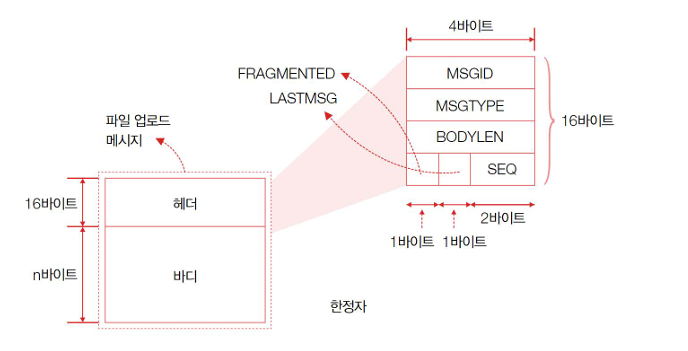
- 바디에는 실제로 전달하려는 데이터를 담고, 헤더에는 본문 길이를 비롯해 메시지의 속성 몇가지를 담습니다.
- 바디의 길이는 데이터에 따라 달라지지만, 헤더의 길이는 16바이트로 항상 일정합니다.
- 따라서 수신한 패킷을 분석할 때는 가장 먼저 16바이트를 먼저 확인해서 메시지의 속성을 확인하고, 그다음에 바다의 길이만큼을 읽어 하나의 메시지 끝을 끊어내야 합니다.
서버/클라이언트가 같이 사용할 클래스 라이브러리 만들기
먼저 FUP 프로토콜을 생성해야합니다.
Message.cs
using System.Reflection.PortableExecutable;

namespace FUP
{
    public class CONSTANTS
    {
        public const uint REQ_FILE_SEND = 0x01;
        public const uint REP_FILE_SEND = 0x02;
        public const uint FILE_SEND_DATA = 0x03;
        public const uint FILE_SEND_RES = 0x04;

        public const byte NOT_FRAGMENTED = 0x00;
        public const byte FRAGMENTED = 0x01;

        public const byte NOT_LASTMSG = 0x00;
        public const byte LASTMSG = 0x01;

        public const byte ACCEPTED = 0x00;
        public const byte DENIED = 0x01;

        public const byte FAIL = 0x00;
        public const byte SUCCESS = 0x01;
    }

    public interface ISerializable
    {
        byte[] GetBytes();
        int GetSize();
    }

    public class Message : ISerializable
    {
        public Header Header { get; set; }
        public ISerializable Body { get; set; }

        public byte[] GetBytes()
        {
            byte[] bytes = new byte[GetSize()];

            Header.GetBytes().CopyTo(bytes, 0);
            Body.GetBytes().CopyTo(bytes, Header.GetSize());

            return bytes;
        }

        public int GetSize()
        {
            return Header.GetSize() + Body.GetSize();
        }
    }
}
Header.cs
using System;

namespace FUP
{
    public class Header : ISerializable
    {
        public uint MSGID { get; set; }
        public uint MSGTYPE { get; set; }
        public uint BODYLEN { get; set; }
        public byte FRAGMENTED { get; set; }
        public byte LASTMSG { get; set; }
        public ushort SEQ { get; set; }

        public Header() { }
        public Header(byte[] bytes)
        {
            MSGID = BitConverter.ToUInt32(bytes, 0);
            MSGTYPE = BitConverter.ToUInt32(bytes, 4);
            BODYLEN = BitConverter.ToUInt32(bytes, 8);
            FRAGMENTED = bytes[12];
            LASTMSG = bytes[13];
            SEQ = BitConverter.ToUInt16(bytes, 14);
        }

        public byte[] GetBytes()
        {
            byte[] bytes = new byte[16];

            byte[] temp = BitConverter.GetBytes(MSGID);
            Array.Copy(temp, 0, bytes, 0, temp.Length);

            temp = BitConverter.GetBytes(MSGTYPE);
            Array.Copy(temp, 0, bytes, 4, temp.Length);

            temp = BitConverter.GetBytes(BODYLEN);
            Array.Copy(temp, 0, bytes, 8, temp.Length);

            bytes[12] = FRAGMENTED;
            bytes[13] = LASTMSG;

            temp = BitConverter.GetBytes(SEQ);
            Array.Copy(temp, 0, bytes, 14, temp.Length);

            return bytes;
        }

        public int GetSize()
        {
            return 16;
        }
    }
}
Body.cs
using System;
using System.Collections.Generic;
using System.Linq;
using System.Text;

namespace FUP
{
    public class BodyRequest : ISerializable
    {
        public long FILESIZE;
        public byte[] FILENAME;

        public BodyRequest() { }
        public BodyRequest(byte[] bytes)
        {
            FILESIZE = BitConverter.ToInt64(bytes, 0);
            FILENAME = new byte[bytes.Length - sizeof(long)];
            Array.Copy(bytes, sizeof(long), FILENAME, 0, FILENAME.Length);
        }

        public byte[] GetBytes()
        {
            byte[] bytes = new byte[GetSize()];
            byte[] temp = BitConverter.GetBytes(FILESIZE);
            Array.Copy(temp, 0, bytes, 0, temp.Length);
            Array.Copy(FILENAME, 0, bytes, temp.Length, FILENAME.Length);

            return bytes;
        }

        public int GetSize()
        {
            return sizeof(long) + FILENAME.Length;
        }
    }

    public class BodyResponse : ISerializable
    {
        public uint MSGID;
        public byte RESPONSE;
        public BodyResponse() { }
        public BodyResponse(byte[] bytes)
        {
            MSGID = BitConverter.ToUInt32(bytes, 0);
            RESPONSE = bytes[4];
        }

        public byte[] GetBytes()
        {
            byte[] bytes = new byte[GetSize()];
            byte[] temp = BitConverter.GetBytes(MSGID);
            Array.Copy(temp, 0, bytes, 0, temp.Length);
            bytes[temp.Length] = RESPONSE;

            return bytes;
        }

        public int GetSize()
        {
            return sizeof(uint) + sizeof(byte);
        }
    }

    public class BodyData : ISerializable
    {
        public byte[] DATA;

        public BodyData(byte[] bytes)
        {
            DATA = new byte[bytes.Length];
            bytes.CopyTo(DATA, 0);
        }

        public byte[] GetBytes()
        {
            return DATA;
        }

        public int GetSize()
        {
            return DATA.Length;
        }
    }

    public class BodyResult : ISerializable
    {
        public uint MSGID;
        public byte RESULT;

        public BodyResult() { }
        public BodyResult(byte[] bytes)
        {
            MSGID = BitConverter.ToUInt32(bytes, 0);
            RESULT = bytes[4];
        }
        public byte[] GetBytes()
        {
            byte[] bytes = new byte[GetSize()];
            byte[] temp = BitConverter.GetBytes(MSGID);
            Array.Copy(temp, 0, bytes, 0, temp.Length);
            bytes[temp.Length] = RESULT;

            return bytes;
        }

        public int GetSize()
        {
            return sizeof(uint) + sizeof(byte);
        }
    }
}
MessageUtil.cs
using System;
using System.IO;

namespace FUP
{
    public class MessageUtil
    {
        public static void Send(Stream writer, Message msg)
        {
            writer.Write(msg.GetBytes(), 0, msg.GetSize());
        }
        public static Message Receive(Stream reader)
        {
            int totalRecv = 0;
            int sizeToRead = 16;
            byte[] hBuffer = new byte[sizeToRead];

            while (sizeToRead > 0)
            {
                byte[] buffer = new byte[sizeToRead];
                int recv = reader.Read(buffer, 0, sizeToRead);
                if (recv == 0)
                    return null;

                buffer.CopyTo(hBuffer, totalRecv);
                totalRecv += recv;
                sizeToRead -= recv;
            }

            Header header = new Header(hBuffer);

            totalRecv = 0;
            byte[] bBuffer = new byte[header.BODYLEN];
            sizeToRead = (int)header.BODYLEN;

            while (sizeToRead > 0)
            {
                byte[] buffer = new byte[sizeToRead];
                int recv = reader.Read(buffer, 0, sizeToRead);
                if (recv == 0)
                    return null;

                buffer.CopyTo(bBuffer, totalRecv);
                totalRecv += recv;
                sizeToRead -= recv;
            }

            ISerializable body = null;
            switch (header.MSGTYPE)
            {
                case CONSTANTS.REQ_FILE_SEND:
                    body = new BodyRequest(bBuffer);
                    break;
                case CONSTANTS.REP_FILE_SEND:
                    body = new BodyResponse(bBuffer);
                    break;
                case CONSTANTS.FILE_SEND_DATA:
                    body = new BodyData(bBuffer);
                    break;
                case CONSTANTS.FILE_SEND_RES:
                    body = new BodyResult(bBuffer);
                    break;
                default:
                    throw new Exception(
                        String.Format(
                        "Unknown MSGTYPE : {0}" + header.MSGTYPE));
            }

            return new Message() { Header = header, Body = body };
        }
    }
}
여기까지 FUP프로토콜입니다.
FileRecever
using System;
using System.Diagnostics;
using System.IO;
using System.Net;
using System.Net.Sockets;
using System.Text;
using FUP;

namespace FileReceiver
{
    class MainApp
    {
        static void Main(string[] args)
        {
            if (args.Length < 1)
            {
                Console.WriteLine("사용법 : {0} <Directory>",
                   Process.GetCurrentProcess().ProcessName);
                return;
            }
            uint msgId = 0;

            string dir = args[0];
            if (Directory.Exists(dir) == false)
                Directory.CreateDirectory(dir);

            const int bindPort = 5425;
            TcpListener server = null;
            try
            {
                IPEndPoint localAddress =
                   new IPEndPoint(0, bindPort);

                server = new TcpListener(localAddress);
                server.Start();

                Console.WriteLine("파일 업로드 서버 시작... ");

                while (true)
                {
                    TcpClient client = server.AcceptTcpClient();
                    Console.WriteLine("클라이언트 접속 : {0} ",
                       ((IPEndPoint)client.Client.RemoteEndPoint).ToString());

                    NetworkStream stream = client.GetStream();

                    Message reqMsg = MessageUtil.Receive(stream);

                    if (reqMsg.Header.MSGTYPE != CONSTANTS.REQ_FILE_SEND)
                    {
                        stream.Close();
                        client.Close();
                        continue;
                    }

                    BodyRequest reqBody = (BodyRequest)reqMsg.Body;

                    Console.WriteLine(
                       "파일 업로드 요청이 왔습니다. 수락하시겠습니까? yes/no");
                    string answer = Console.ReadLine();

                    Message rspMsg = new Message();
                    rspMsg.Body = new BodyResponse()
                    {
                        MSGID = reqMsg.Header.MSGID,
                        RESPONSE = CONSTANTS.ACCEPTED
                    };
                    rspMsg.Header = new Header()
                    {
                        MSGID = msgId++,
                        MSGTYPE = CONSTANTS.REP_FILE_SEND,
                        BODYLEN = (uint)rspMsg.Body.GetSize(),
                        FRAGMENTED = CONSTANTS.NOT_FRAGMENTED,
                        LASTMSG = CONSTANTS.LASTMSG,
                        SEQ = 0
                    };

                    if (answer != "yes")
                    {
                        rspMsg.Body = new BodyResponse()
                        {
                            MSGID = reqMsg.Header.MSGID,
                            RESPONSE = CONSTANTS.DENIED
                        };
                        MessageUtil.Send(stream, rspMsg);
                        stream.Close();
                        client.Close();

                        continue;
                    }
                    else
                        MessageUtil.Send(stream, rspMsg);

                    Console.WriteLine("파일 전송을 시작합니다...");

                    long fileSize = reqBody.FILESIZE;
                    string fileName = Encoding.Default.GetString(reqBody.FILENAME);
                    FileStream file =
                       new FileStream(dir + "\\" + fileName, FileMode.Create);

                    uint? dataMsgId = null;
                    ushort prevSeq = 0;
                    while ((reqMsg = MessageUtil.Receive(stream)) != null)
                    {
                        Console.Write("#");
                        if (reqMsg.Header.MSGTYPE != CONSTANTS.FILE_SEND_DATA)
                            break;

                        if (dataMsgId == null)
                            dataMsgId = reqMsg.Header.MSGID;
                        else
                        {
                            if (dataMsgId != reqMsg.Header.MSGID)
                                break;
                        }

                        if (prevSeq++ != reqMsg.Header.SEQ)
                        {
                            Console.WriteLine("{0}, {1}", prevSeq, reqMsg.Header.SEQ);
                            break;
                        }

                        file.Write(reqMsg.Body.GetBytes(), 0, reqMsg.Body.GetSize());

                        if (reqMsg.Header.LASTMSG == CONSTANTS.LASTMSG)
                            break;
                    }

                    long recvFileSize = file.Length;
                    file.Close();

                    Console.WriteLine();
                    Console.WriteLine("수신 파일 크기 : {0} bytes", recvFileSize);

                    Message rstMsg = new Message();
                    rstMsg.Body = new BodyResult()
                    {
                        MSGID = reqMsg.Header.MSGID,
                        RESULT = CONSTANTS.SUCCESS
                    };
                    rstMsg.Header = new Header()
                    {
                        MSGID = msgId++,
                        MSGTYPE = CONSTANTS.FILE_SEND_RES,
                        BODYLEN = (uint)rstMsg.Body.GetSize(),
                        FRAGMENTED = CONSTANTS.NOT_FRAGMENTED,
                        LASTMSG = CONSTANTS.LASTMSG,
                        SEQ = 0
                    };

                    if (fileSize == recvFileSize)
                        MessageUtil.Send(stream, rstMsg);
                    else
                    {
                        rstMsg.Body = new BodyResult()
                        {
                            MSGID = reqMsg.Header.MSGID,
                            RESULT = CONSTANTS.FAIL
                        };

                        MessageUtil.Send(stream, rstMsg);
                    }
                    Console.WriteLine("파일 전송을 마쳤습니다.");

                    stream.Close();
                    client.Close();
                }
            }
            catch (SocketException e)
            {
                Console.WriteLine(e);
            }
            finally
            {
                server.Stop();
            }

            Console.WriteLine("서버를 종료합니다.");
        }
    }
}
FileSender
using System;
using System.Diagnostics;
using System.IO;
using System.Net;
using System.Net.Sockets;
using FUP;

namespace FileSender
{
    class MainApp
    {
        const int CHUNK_SIZE = 4096;

        static void Main(string[] args)
        {
            if (args.Length < 2)
            {
                Console.WriteLine(
                    "사용법 : {0} <Server IP> <File Path>",
                    Process.GetCurrentProcess().ProcessName);
                return;
            }

            string serverIp = args[0];
            const int serverPort = 5425;
            string filepath = args[1];

            try
            {
                IPEndPoint clientAddress = new IPEndPoint(0, 0);
                IPEndPoint serverAddress =
                    new IPEndPoint(IPAddress.Parse(serverIp), serverPort);

                Console.WriteLine("클라이언트: {0}, 서버:{1}",
                    clientAddress.ToString(), serverAddress.ToString());

                uint msgId = 0;

                Message reqMsg = new Message();
                reqMsg.Body = new BodyRequest()
                {
                    FILESIZE = new FileInfo(filepath).Length,
                    FILENAME = System.Text.Encoding.Default.GetBytes(filepath)
                };
                reqMsg.Header = new Header()
                {
                    MSGID = msgId++,
                    MSGTYPE = CONSTANTS.REQ_FILE_SEND,
                    BODYLEN = (uint)reqMsg.Body.GetSize(),
                    FRAGMENTED = CONSTANTS.NOT_FRAGMENTED,
                    LASTMSG = CONSTANTS.LASTMSG,
                    SEQ = 0
                };

                TcpClient client = new TcpClient(clientAddress);
                client.Connect(serverAddress);

                NetworkStream stream = client.GetStream();

                MessageUtil.Send(stream, reqMsg);

                Message rspMsg = MessageUtil.Receive(stream);

                if (rspMsg.Header.MSGTYPE != CONSTANTS.REP_FILE_SEND)
                {
                    Console.WriteLine("정상적인 서버 응답이 아닙니다.{0}",
                        rspMsg.Header.MSGTYPE);
                    return;
                }

                if (((BodyResponse)rspMsg.Body).RESPONSE == CONSTANTS.DENIED)
                {
                    Console.WriteLine("서버에서 파일 전송을 거부했습니다.");
                    return;
                }

                using (Stream fileStream = new FileStream(filepath, FileMode.Open))
                {
                    byte[] rbytes = new byte[CHUNK_SIZE];

                    long readValue = BitConverter.ToInt64(rbytes, 0);

                    int totalRead = 0;
                    ushort msgSeq = 0;
                    byte fragmented =
                        (fileStream.Length < CHUNK_SIZE) ?
                        CONSTANTS.NOT_FRAGMENTED : CONSTANTS.FRAGMENTED;
                    while (totalRead < fileStream.Length)
                    {
                        int read = fileStream.Read(rbytes, 0, CHUNK_SIZE);
                        totalRead += read;
                        Message fileMsg = new Message();

                        byte[] sendBytes = new byte[read];
                        Array.Copy(rbytes, 0, sendBytes, 0, read);

                        fileMsg.Body = new BodyData(sendBytes);
                        fileMsg.Header = new Header()
                        {
                            MSGID = msgId,
                            MSGTYPE = CONSTANTS.FILE_SEND_DATA,
                            BODYLEN = (uint)fileMsg.Body.GetSize(),
                            FRAGMENTED = fragmented,
                            LASTMSG = (totalRead < fileStream.Length) ?
                                      CONSTANTS.NOT_LASTMSG :
                                      CONSTANTS.LASTMSG,
                            SEQ = msgSeq++
                        };

                        Console.Write("#");

                        MessageUtil.Send(stream, fileMsg);
                    }

                    Console.WriteLine();

                    Message rstMsg = MessageUtil.Receive(stream);

                    BodyResult result = ((BodyResult)rstMsg.Body);
                    Console.WriteLine("파일 전송 성공 : {0}",
                        result.RESULT == CONSTANTS.SUCCESS);
                }

                stream.Close();
                client.Close();
            }
            catch (SocketException e)
            {
                Console.WriteLine(e);
            }

            Console.WriteLine("클라이언트를 종료합니다.");
        }
    }
}'C#' 카테고리의 다른 글
| c#테트리스 게임만들기 (0) | 2024.11.04 |
|---|---|
| Task (0) | 2024.11.03 |
| 대리자와 이벤트 (0) | 2024.11.01 |
| 프로그래밍 (0) | 2024.11.01 |
| 배열과 컬렉션 그리고 인덱서 (0) | 2024.11.01 |


댓글